TABLE OF CONTENTS
What is a customer?
A customer is the main entity/parent housing all accounting details. This is the individual or business account used for reporting, pricing & rep com structures.
Customers cannot be deleted once created.
What is a sub customer?
This is a child or store underneath the main customer. Sub customers represent a branch, store or franchise which have a different physical address to the parent company.
Each sub customer belongs to one main customer and cannot exist on its own.
Sub customers cannot be deleted once created
Overview
| Concept | Customer | Sub Customer |
|---|---|---|
| Level | Parent | Child |
| Purpose | Main account | Branch/Division/Store |
| Can exist alone? | ✔ Yes | ✖ No |
| Accounting details (terms, currency, tax type) apply to | Customer | Inherits from parent |
| Key settings (reps, credit, etc.) apply to | Customer | Inherits from parent |
| Typical use | Company | Stores with different physical address |
Example:
Customer: Eco Swimwear
Sub Customers: Eco Swimwear Bondi, Eco Swimwear Laguna, Eco Swimwear Dana Point
Customer Fields
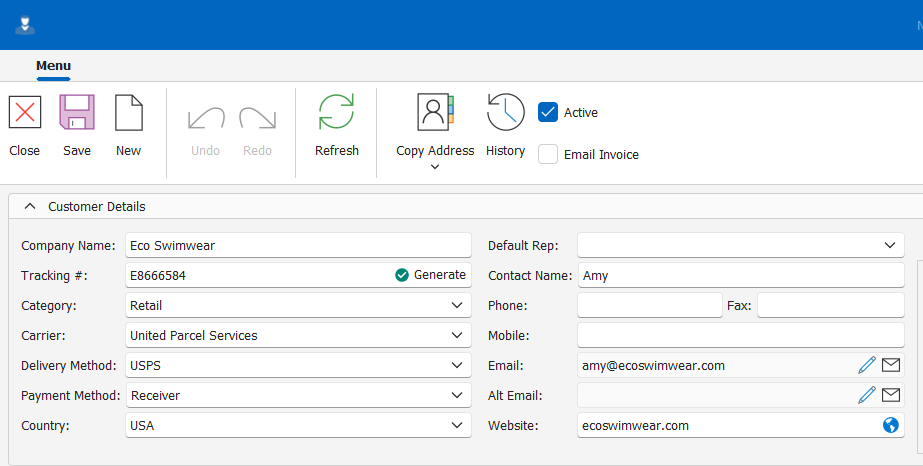
Customer Details
| FIELD | DESCRIPTION | REQUIRED | INHERITED BY SUBCUSTOMER | EXAMPLE |
| Active | Specifies if the customer is active or inactive. users will only be able to select Active customers for new sales orders. *Defaults to Active | Yes | No | Checked |
| Email Invoice | Specifies if invoices should be automatically emailed to the customer's email. *Defaults to Unchecked | Yes | No | Unchecked |
| Company Name | The name of the company or individual to which you are selling | Yes | Yes | Eco Swimwear |
| Tracking # | Unique code used to identify the company. *Can be auto generated | Yes | No | E8666584 |
| Category | Specifies the default category of the customer which determines if Sales Orders inherit the Wholesale or Retail selling price. | Yes | Yes | Retail |
| Carrier | Specifies the default carrier/service of the customer to apply to sales orders | No | Yes | United Parcel Service |
| Delivery Method | Specifies the default delivery method of the customer to apply to sales orders. *Will default to the default Delivery method if configured | No | No | USPS |
| Payment Method | Specifies the default payment method of the customer to apply to sales orders. *Will default to the default Payment method if configured | No | No | Receiver |
| Country | Specifies the country where the customer is registered | No | Yes | USA |
| Default Rep | Specifies the default rep of the customer to apply to sales orders which determines the discount & rep commission. | No | Yes | |
| Contact Name | The name of the primary contact person at the customer | Yes | No | Amy |
| Phone | Landline contact number for the customer | No | No | 082 345 8635 |
| Mobile | Cell phone number of the primary contact at the customer | No | No | |
| Primary email address/ addresses to which invoices should be emailed. *If email Invoice is checked | No | No | amy@ecoswimwear.com | |
| Alt Email | Secondary email address/addresses for the customer. These will not receive emailed invoices. | No | No | returns@ecoswimwear.com |
| Website | Customers website addresses | No | No | ecoswimwear.com |
Customer Address Details
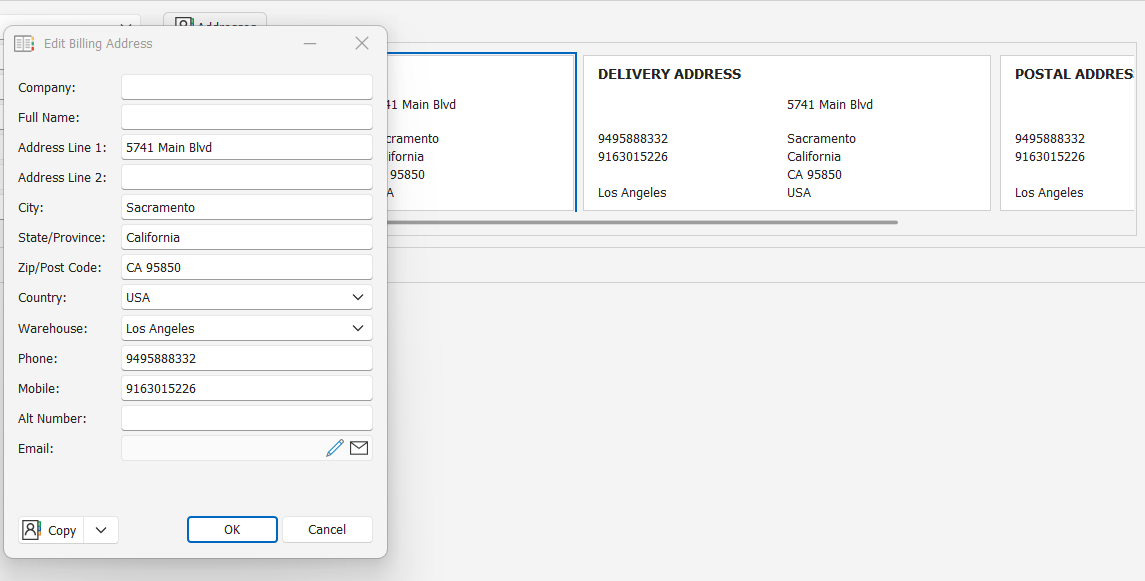
Customers can have separate Billing, Delivery & Postal addresses each comprising of the below fields. Alternatively you can copy the same address details to all three fields.
Billing, Delivery & Postal addresses are required to be populated with minimum required fields below.
Billing & delivery Adress details for the customer apply only to the customer & are not inherited by the sub customer
Billing address: automatically applied to invoices for the customers' orders
Delivery address: automatically applied to the sales orders for the customer specifying the physical address for delivery
| FIELD | DESCRIPTION | REQUIRED | EXAMPLE |
| Company | Name of the company for the specified address | No | |
| Full Name | Name of your primary contact for adress detail | No | Amy |
| Address Line 1 | Unit number & street address | Yes | 5741 Main Blvd |
| Address Line 2 | Building/complex/office park name if applicable | No | |
| City | Name of the City | No | Sacramento |
| State/ Province | Name of the province for address details | No | California |
| Zip/ Post Code | Adress zip/ postal code | No | CA 95850 |
| Country | Country in which the address falls | No | USA |
| Warehouse | For the Delivery address this specifies the Sync default warehouse where stock should be pulled/picked from for the customers' orders. *Will default to the default warehouse configured | Yes | Los Angeles |
| Phone | Landline number | No | (949) 588 8332 |
| Mobile | Cell phone number | No | (916) 301‑5226 |
| Alt Number | Alternate number | No | |
| email for the associated address details | No |
*If WMS integration is active there may be specific address detail rules/ naming conventions to follow.
Customer Accounting Details
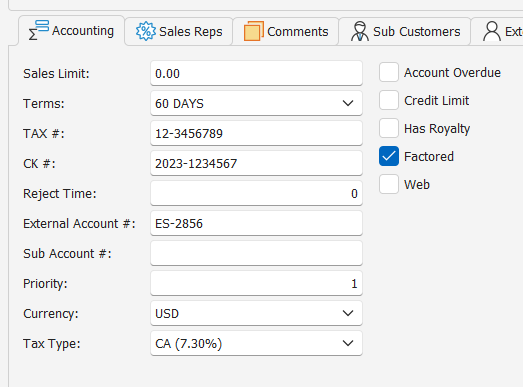
| FIELD | DESCRIPTION | INHERITED BY SUB CUSTOMER | REQUIRED | EXAMPLE |
| Sales Limit | numeric value for reporting purposes only to specify a sales value limit on the customer | NA | No | 10000 |
| Terms | Specifies the default payment terms to apply to customers' orders | Yes | Yes | 60 Days |
| Tax # | Customer tax number if tax/VAT registered | Yes | No | 12-3456789 |
| CK # | Customers registration number | Yes | No | 2023-1234567 |
| Reject Time | No | No | ||
| External Account # | The external account number used to link the customer to other financial systems | No | No | ES-2856 |
| Sub Account # | Yes | No | ||
| Priority | Specifies the order of priority to apply to the customers' orders when using various picking modules in Sync | Yes | No | 1 |
| Currency | Specifies the default currency to apply to the customers' orders | Yes | Yes | USD |
| Tax Type | Specifies the default tax type to apply to customer orders. *Will default to the default tax type configured | Yes | No | CA (7.3) |
| Account Overdue | Indicates if the customer has an overdue payment on their account. If checked the customers' orders cannot be invoiced. | No | No | False |
| Credit Limit | Indicates if the customer has reached their credit limit. If checked an alert will pop up at point of invoicing but invoicing will not be prevented | No | No | False |
| Has Loyalty | Yes | No | False | |
| Factored | Indicates if the customer is factored or not. Typically used for integration with factoring houses. | Yes | No | True |
| Web | Indicates is the customers' orders originate from the web-i.e. ecommerce. | Yes | No | False |
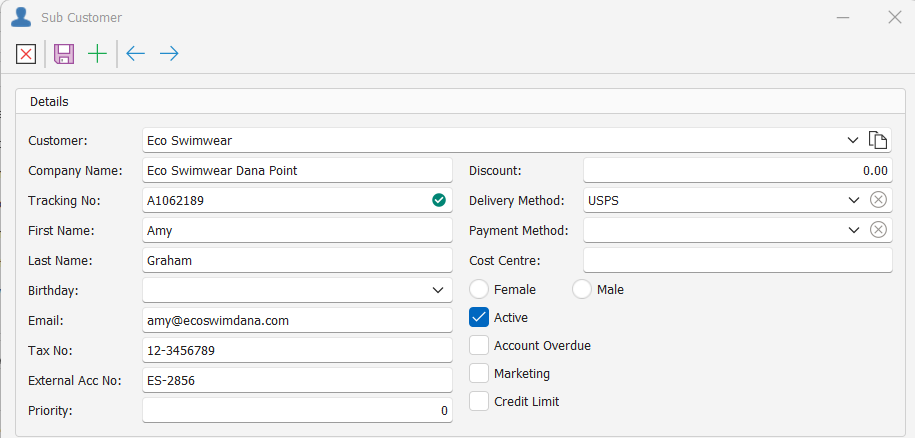
Sub Customer Fields
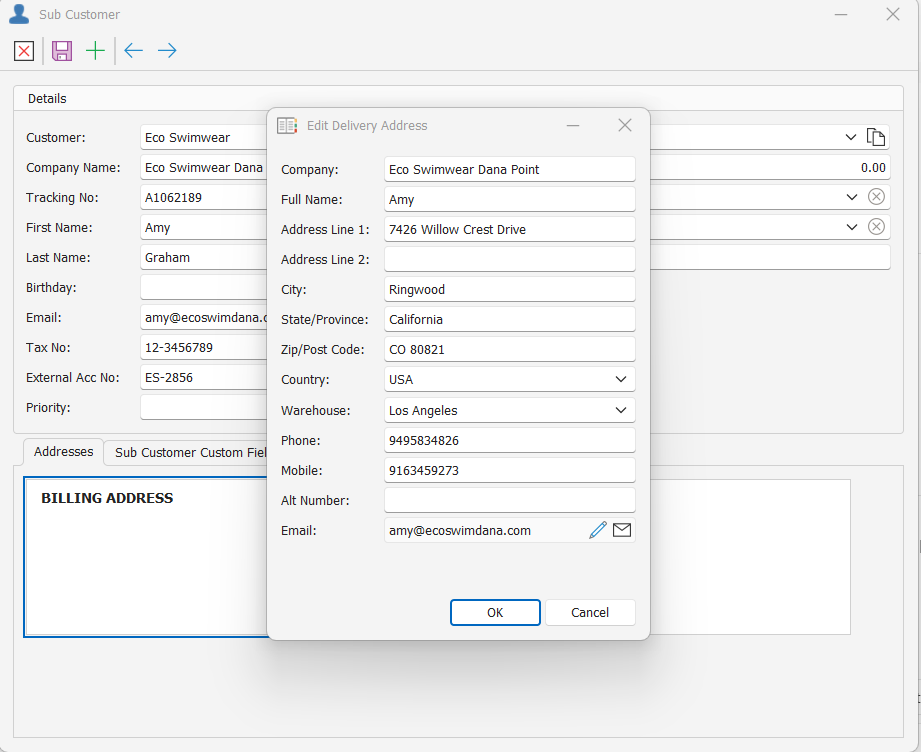
Sub Customer Details
| FIELD | DESCRIPTION | REQUIRED | EXAMPLE |
| Customer | Name of the main/ parent customer under which the Sub customer lies. *Will default to the main customer if added from within the customer | Yes | Eco Swimwear |
| Company Name | Sub Customer name/ store name | Yes | Eco Swimwear Dana Point |
| Tracking No | Unique code used to identify the company. *Can be auto generated | Yes | A1062189 |
| First Name | First name of the primary contact at the sub customer | Yes | Amy |
| Last Name | Surname/family name of the primary contact at the sub customer | Yes | Graham |
| Birthday | Birthday of the primary contact- purely for custom reporting purposes | No | |
| Primary email address to which invoices should be emailed. *If email Invoice & invoice sub customer is checked | Yes | amy@ecoswimdana.com | |
| Tax No | Customer tax number if tax/VAT registered | No | 12-3456789 |
| External Acc No | The external account number used to link the customer to other financial systems | No | ES-2856 |
| Priority | Specifies the order of priority to apply to the sub customers' orders when using various picking modules in Sync | No | - |
| Discount | No | - | |
| Delivery Method | Specifies the default delivery method of the sub customer to apply to sales orders. | No | USPS |
| Payment Method | Specifies the default payment method of the sub customer to apply to sales orders. | No | - |
| Active | Specifies if the sub customer is active or inactive. users will only be able to select Active sub customers for new sales orders. *Defaults to Active | No | Checked |
| Account Overdue | Indicates if the sub customer has an overdue payment on their account. If checked the sub customers' orders cannot be invoiced. | No | - |
| Marketing | No | - | |
| Credit Limit | Indicates if the sub customer has reached their credit limit. If checked an alert will pop up at point of invoicing but invoicing will not be prevented | No | - |
Sub Customer Address Details
Sub Customers can have separate Billing& Delivery addresses each comprising of the below fields. Alternatively, you can copy the same address details to both fields.
Billing, Delivery addresses are not required for sub customers.
Billing address: automatically applied to invoices for the sub customers' orders- when invoicing by sub customer
Delivery address: automatically applied to the sales orders for the sub customer specifying the physical address for delivery
| FIELD | DESCRIPTION | REQUIRED | EXAMPLE |
| Company | Name of the company for the specified address | No | Eco Swimwear Dana Point |
| Full Name | Name of your primary contact for adress detail | No | Amy |
| Address Line 1 | Unit number & street address | Yes | 7426 Willow Crest Drive |
| Address Line 2 | Building/complex/office park name if applicable | No | |
| City | Name of the City | No | Ringwood |
| State/ Province | Name of the province for address details | No | California |
| Zip/ Post Code | Adress zip/ postal code | No | CO 80821 |
| Country | Country in which the address falls | No | USA |
| Warehouse | For the Delivery address this specifies the Sync default warehouse where stock should be pulled/picked from for the customers' orders. *Will default to the default warehouse configured | Yes | Los Angeles |
| Phone | Landline number | No | (949) 583 4826 |
| Mobile | Cell phone number | No | (916) 345‑9273 |
| Alt Number | Alternate number | No | |
| email for the associated address details | No | amy@ecoswimdana.com |
*If WMS integration is active there may be specific address detail rules/ naming conventions to follow.