
Cost Types & Sub Types drive BOM accuracy and aid correct BOM costing. They help standardise costing across teams & allow for controlled updates & reporting.
TABLE OF CONTENTS
Cost Types:
These are the main categories of costs used to build the total cost of a garment. Cost Types group similar cost elements together in your costings & for reporting purposes.
Cost Types are configured in Sync by your implementation'stations consultant or support team.
Cost types cannot be deleted once configured.
Cost types should be kept to a core list as below. Diverging from this list or adding further segmented Cost Types can impact consistency & reporting. 'Sub classification' of a cost types is typically done via the sub types code structure.
Standard Cost Types
| COST TYPE | WHAT IT COVERS | EXAMPLES |
| Product | Imported/ externally manufactured garments: cost of the garment to you already including labour, fabric & trims costs. In house manufacturing: The labour cost of making the garment/ CMT (Cut Make Trim) cost. Includes cutting, sewing, finishing. *Can be auto- overridden by workstudy values depending on Sync config. | Dress, T-Shirt, shorts, cap |
| Fabric | All raw materials used to make/ construct the garment shell | Cotton, jersey, rib, lining fabrics |
| Trims | Small components attached to the garment | Buttons, zippers, labels, elastic |
| Packaging | Costs related to preparing finished goods for shipping or display | Polybags, hangers, swing tags, cardboard inserts |
| Transport/ Freight | Covers logistics costs for moving materials or finished goods | Courier, import freight, delivery charges |
| Outwork | Production tasks that are outsourced to external providers | Embroidery, screen printing, heat transfers, washing, laser cutting |
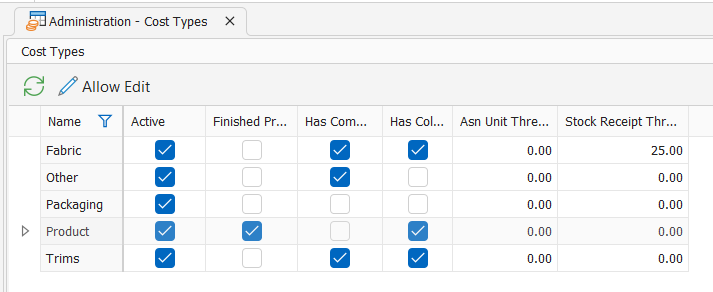
Cost Type Fields:
| FIELD | DESCRPTION | EXAMPLE |
| Name | Name of the cost type | Product |
| Active | Specifies if the cost type is active or inactive. Users can only select active cost types when doing new costings. | True |
| Finished Product | Indicates if the cost type is considered as the Product line/ Blue line of the costing. The product line is the cost that will get added to your PPO. 'Product' cost type should be the only one marked as Finished product | True |
| Has Comments | Indicates if text comments are permitted on the cost type. These can be used for internal notes or reporting | False |
| Has Colour | Specifies if the cost sub types require a colour to be specified or not | True |
| ASN Unit Threshold | Indicates the unit % for over receiving when delivering an ASN (if using thee ASN module) | 2 |
| Stock Receipt Threshold | Indicates the unit % for over receiving when doing a GRV | 0 |
Cost Sub Types:
Specific items used in your BOM which live underneath each cost type.
Cost Sub types are created & managed by Sync users.
Cost Sub Types cannot be deleted once added to a BOM.
Cost Sub Type Examples
| COST TYPE | EXAMPLE |
| Product | FG017- Dress |
| Fabric | FAB001- Cotton Lycra Rib |
| Trims | ZIP025- YKK Zip 30cm BTN100- Metal Button |
| Packaging | PKG015- Polybag |
| Transport/ Freight | FR023- Overnight courier |
| Outwork | OUT523- Embroidery |
Cost Type Fields:
| FIELD | DESCRPTION | EXAMPLE |
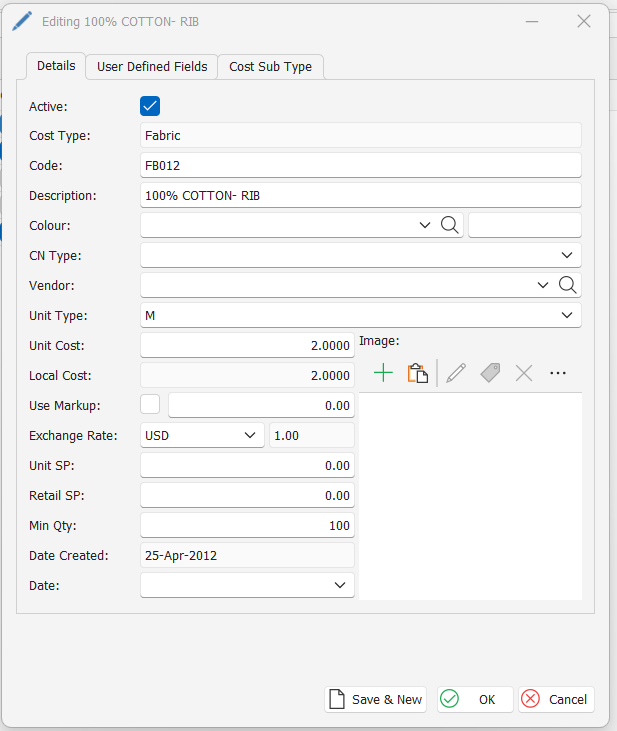
| Active | Specifies if the cost sub type is active or inactive. Users can only select active cost sub types when doing new costings. | True |
| Cost Type | Specifies the cost type under which this sub type falls | Fabric |
| Code | Unique identifying code for the sub type | FB012 |
| Description | Text description to correctly & easily identify the correct sub type | 100% Cotton- Rib |
| Colour | Specifies the chosen colour for the sub type. *only available if the Cost type config is set to 'has colour' is True ** colour is not always defined on the sub type. it is commonly only defined in the BOM to avoid sub type listings becoming too long & unmanageable. | - |
| Vendor | Specifies the vendor the sub type is purchased from | |
| Unit Type | Type of measurement the cost type is ordered & costed in | M (meters) |
| Unit Cost | Unit cost for the sub type to auto apply to costing | 2.0000 |
| Local Cost | Auto calculated field based on exchange rate | 2.0000 |
| Exchange rate | Exchange currency & rate to apply to calculate local cost per unit | USD; 1.00 |
| Min QTY | Indicates minimum qty f units to have as stockkc on hand for the sub type. This field is used for reporting purposes | 100 |
| Date Created | Auto populated field indicated the date the sub type was first created in Sync |
Related Help:
- Add a New Sub-Type within Sync Administration
- Search for a Cost SubType within Sync Administration
- Duplicate a Cost-Sub Type within Sync Administration
- Set a Cost Sub-Type as Active or Inactive
- Batch Update Sub-Type Costs from within Sync Administration
- Delete Cost Sub Types