
Setting up Report API
Without Print API URL (business rule):
System reports are handled through the Sync Web Service, when running a report, it will be downloaded in the devices ‘downloads’ folder.
Once downloaded, the report will be opened in a .pdf viewer where a user may then select a printer on the same network as the device to print (a default may be set in the printer service plugin)
Install .pdf viewer and printer service on device – included in the SyncScanner file package or can be downloaded from the play store. In the case of the included apps (.pdf viewer & printer service plugin)
- Ensure the reports are in a common folder where the user has access
- Set the business rule ‘report_store_text value to point to that folder
- Make sure the server where the report files are has access to the DB
- Set the business rule ‘report_connection_string text value to point to the DB (if connecting remotely, the port that is exposed to the DB will need to be included in the string
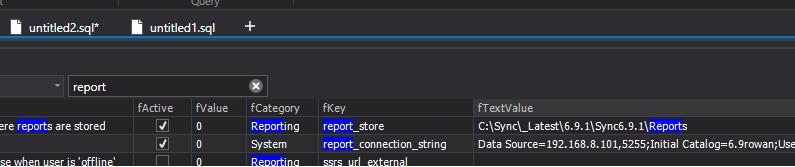
Eg:
report_connection_string: Data Source=192.168.101.2,5225;Initial Catalog=6.9rowan;User ID=rowan/isync;Password=xxxxxxxxx
report_store: C:\Sync\_Latest\DX Reports
SyncScanner PDF Viewer APK (PDF Viewer Pro 4.0.1 (arm-v7a) (nodpi) APK Download by PSPDFKit GmbH - APKMirror)
https://www.apkmirror.com/apk/pspdfkit-gmbh/pdf-viewer/pdf-viewer-4-0-1-release/pdf-viewer-pro-4-0-1-5-android-apk-download/download/?forcebaseapk
With Print API URL (for label printing)
ReportingAPI
- Install on local machine (IIS) that has access to printers
- Set API address in web config to point to remote Sync API
DB
- Set print_api_url to ReportingAPI address
- Set report_store to folder where DevExpress reports exist
Scanner
- Set printer address using following format - \\PCNAME\PRINTERNAME
BIN FILES
Make sure CrystalDecision DLLs are removed, otherwise the WCF service will fail
PDF Viewer Pro 4.0.1 (arm-v7a) (nodpi) (Android 4.4+) APK Download by PSPDFKit GmbH - APKMirror
PDF Viewer Pro 4.0.1 (arm-v7a) (nodpi) (Android 4.4+) APK Download by PSPDFKit GmbH - APKMirror Free and safe Android APK downloads
Setting up Label Printing
ReportingAPI
- Install on local machine (IIS) that has access to printers
- Set API address in web config to point to remote Sync API
DB
- Set print_api_url to ReportingAPI address
- Set report_store to folder where DevExpress reports exist
Scanner
- Set printer address using following format - \\PCNAME\PRINTERNAME