
This article outlines the steps to follow for doing month end recon between the Valuation & Movement Reports in Sync. This applies to both Stock/ Materials and Product Stock/ Finished Goods recons.
*Custom reports deployed or custom processes may result in different recon steps needing to be followed.
Check with your account manager or Sync support for further clarity.
When looking at Product Cost Valuation & Movement reference the below two reports:
- Stock/ Product Stock Movement Recon
- Stock/ Product Stock Valuation by Date
*Names may vary slightly between Sync instances
Steps
- Valuation report 'Opening date' should equal the closing date of your last period- i.e. 31 Jan
- Valuation report 'Closing date' should be the last day of your current period- i.e. 28 Feb
- Movement recon dates should be set to the first & last day of your current period- i.e. 1 Feb to 28 Feb
- All report parameters should match between Valuation & Movement report- best is to run for ALL
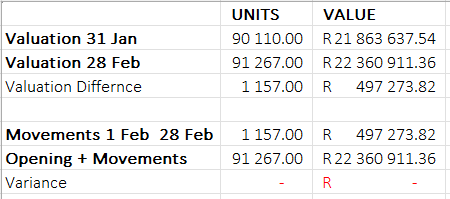
See below recon completed for 1 to 28 Feb with zero variance:
Where financial integration exists with cost being pulled back into Sync
- value based valuation reporting should be run out of your financial system.
- Unit based valuation reporting can be run from Sync but this will use the systems CURRENT cost so report should not be backdated.